PDF Documents
Using the Interactive PDF Application
Prerequisites
In order to ensure the best experience using this PDF paperwork it is recommended that you use the latest version of Adobe Acrobat software.
To install the latest version please visit http://get.adobe.com/reader/
Filling in the Interactive PDF Paperwork
This PDF paperwork alleviates the hassle of filling out an application manually using paper and pen. Now all of your applications can be typed and professional looking.
Every question on the application is now an interactive form field. To enter data into the paperwork simply click the mouse in an area of the paperwork that you wish to type something and start typing. Checkboxes can also be checked or unchecked simply by clicking on them with your mouse. After completing a section you can use your Tab button to move to the next section.
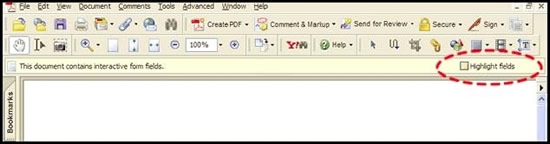
In Acrobat 7.0 it is possible to make all of the interactive form fields appear highlighted so that it is easier to know where to click your mouse. Highlighting the form fields will not change how the paperwork looks when it is printed out.
After opening a blank PDF form you should notice a message bar that appears just above the document, and just below the standard toolbars. Check the box on the very right of the message bar, "Highlight Form Fields" (see below).
Saving the PDF Application
*** Important notice to Acrobat Reader Users ***
Due to restrictions imposed by Adobe, Acrobat Reader users are not allowed to save their changes to the PDF paperwork or to export the data for storage on their local computer. This means that with Reader, after you have finished filling out an application the only thing you can do with it is print it out.
Users of Acrobat Standard or Acrobat Professional are allowed to save the completed PDF and to export data. Unfortunately, both these versions of the Acrobat software cost several hundred dollars. For users wishing to save the data they enter, but do not wish to purchase Acrobat Standard or Professional there is a low cost alternative to using Acrobat Reader that will allow you to save completed paperwork. This product is called CutePDF Form Filler made by Acro Software Inc. and costs about $30 dollars.
You can purchase and download CutePDF here: http://www.acrosoftware.com/Products/CutePDF/Filler.asp.
To save your completed application paperwork using Acrobat Standard or Professional perform the following:
From the menu bar click onFile and then Save As. Then choose a location on your local PC, that you will remember, to store the saved file. Choosing Save As is very important to ensure you don't overwrite the blank application paperwork which you'll need to fill out future applications.